
The Anatomy of a Well-Engineered LLM Context Window
A production LLM context window has structural regions — policy, task, evidence, examples, metadata. Use this anatomy and audit checklist before you ship.

Open a production trace, paste the full prompt into a doc, and highlight what each paragraph does. In most systems, thirty percent of the tokens are unlabeled noise — duplicated policy, raw JSON, greeting text from three turns ago, and chunks whose retrieval score nobody logged. The model receives a wall of text. Your engineers receive incidents.
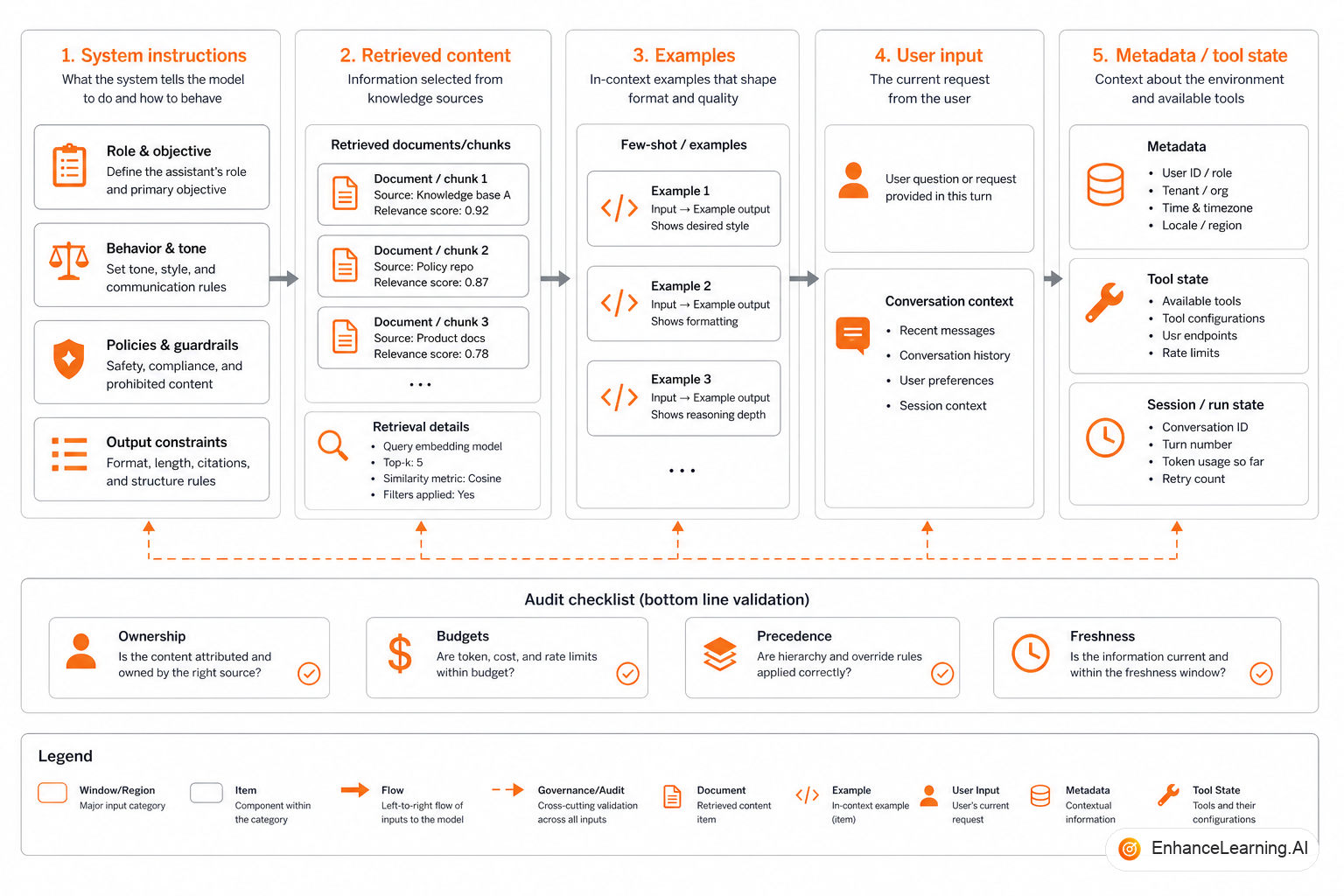
A well-engineered context window is not one optimized string. It is a structured assembly with named regions, each with a job, budget, and owner. When you can draw the anatomy, you can debug failures in minutes instead of rewriting prompts for weeks.
The five structural components#
Every production call — chat, agent step, batch job — decomposes into recurring regions. Not every workflow uses all five on every call, but each should be a deliberate choice, not an accident.
| Region | Purpose | Typical role | Stability |
|---|---|---|---|
| System instructions | Policy, safety, tool rules, persona boundaries | system | Versioned; changes rarely |
| Retrieved content | Evidence from RAG, search, or tools | user or tool | Per request / per turn |
| Examples | Few-shots demonstrating format or edge cases | system or dedicated block | Versioned; curated set |
| User input | Current task, query, or ticket body | user | Per request |
| Metadata | IDs, timestamps, policy version, locale, scores | Prefix lines or structured fields | Per request |
The table is the contract. If something in your prompt does not map to a row, it is probably noise — or you need a new row with an owner.
System instructions: stable policy, not a junk drawer#
System instructions answer: what kind of actor is the model, what must it never do, and what output shape does downstream code expect?
Good system regions are short, stable, and free of request-specific facts. Bad system regions accumulate everything someone wanted the model to "always remember" — release notes, pricing tables, feature flags — because editing assembly felt harder than editing one string.
Rule of thumb: if it changes per ticket or per user session, it does not belong in the system region. Put volatile facts in evidence or metadata lines where traces can show they were present.
Retrieved content: evidence with provenance#
Retrieved content is not "extra paragraphs." It is evidence the model may cite or reason over. Engineering requirements:
- Each chunk carries an ID visible in the prompt
- Source and freshness metadata appear on the chunk header
- Chunks are ordered by score or relevance, not insertion order
- A budget cap triggers eviction, not silent mid-chunk truncation
When the model cites [chunk:884] and that ID is absent from the pack, you have a hallucination. When [chunk:884] is present but wrong, you have a retrieval bug. Provenance makes the distinction observable.
Examples: format demonstrations, not production data#
Few-shot examples teach shape: how to write JSON, how to phrase a refusal, how to reference a citation. They are not a substitute for retrieval and should not contain live customer data copied from tickets.
Engineer examples as a versioned set with:
- Coverage of edge cases your validator cares about
- Consistent delimiters matching your output parser
- Token cost tracked — three long examples can consume more budget than your evidence region
Rotate examples when your output schema changes. Stale few-shots that show old field names train the model to fail your current validator.
User input: the task, isolated#
The current user message should state the task clearly — often the ticket body, question, or command. It should not also carry full history if history has its own slot.
A common bug: the frontend sends user_input that already includes concatenated chat history because "the model needs context." Meanwhile assembly also appends history. The task repeats three times; the actual question is paragraph four.
Isolate the task. Put history in a labeled memory region with its own budget.
Metadata your validators depend on#
Metadata lines are cheap tokens with outsized debugging value:
Pack metadata
4 fields
They help humans in traces and give the model anchors for structured output. They also let post-processors verify that the pack matched the case the user thought they were running.
Visible headers like [policy], [evidence], [task] cost a few tokens and save hours when a region overflows or lands in the wrong message role.
Assembly code should mirror the anatomy#
Regions belong in code, not in someone's head:
import { encode } from "gpt-tokenizer"; // or provider-native counter

interface RegionBudgets {
  system: number;
  examples: number;
  evidence: number;
  memory: number;
  task: number;
}

interface ContextAnatomy {
  system: string;
  examples: string[];
  evidence: Array<{ id: string; text: string; score: number }>;
  memory: string;
  task: string;
  metadata: Record<string, string>;
}

function buildMessages(
  anatomy: ContextAnatomy,
  budgets: RegionBudgets,
): Array<{ role: "system" | "user"; content: string }> {
  const system = packText(
    "[policy]\n" + anatomy.system,
    budgets.system,
  );
  const examples = packList(anatomy.examples, budgets.examples);
  const evidence = packEvidence(anatomy.evidence, budgets.evidence);
  const meta = formatMetadata(anatomy.metadata);
  const memory = anatomy.memory
    ? packText("[memory]\n" + anatomy.memory, budgets.memory)
    : "";
  const task = packText("[task]\n" + anatomy.task, budgets.task);

  return [
    { role: "system", content: [system, examples].filter(Boolean).join("\n\n") },
    {
      role: "user",
      content: [meta, memory, evidence, task].filter(Boolean).join("\n\n"),
    },
  ];
}

function packEvidence(
  chunks: ContextAnatomy["evidence"],
  maxTokens: number,
): string {
  const sorted = [...chunks].sort((a, b) => b.score - a.score);
  const lines: string[] = [];
  let used = 0;
  for (const c of sorted) {
    const block = `[evidence:${c.id} score=${c.score.toFixed(2)}]\n${c.text}`;
    const n = encode(block).length;
    if (used + n > maxTokens) break;
    lines.push(block);
    used += n;
  }
  return lines.join("\n\n");
}
If packEvidence returns empty and your workflow requires citations, do not call the model. Fix retrieval or escalate.
Audit checklist before you ship#
Run this on any new workflow or before a major launch:
- Region map — Can you label every paragraph with policy, evidence, example, task, or metadata?
- Budget table — Are max tokens per region documented and enforced in code?
- Completion — Is total input at least 15–25% below model limit after reserving output tokens?
- Provenance — Does every evidence block have an ID logged in traces?
- Ordering — Is high-signal content before low-signal content within each region?
- Duplication — Is the same policy or task repeated in multiple roles?
- Volatility — Did anything request-specific leak into the system region?
- Failure path — What happens when evidence is empty or over budget?
- Observability — Do traces include token counts per region and a pack hash?
- Eval coverage — Do golden tests vary evidence fixtures independently of prompt text?
Score honestly. Fewer than eight checks passing means you have a textarea, not an engineered window.
Common anatomical failures#
- Policy in user message — breaks caching, mixes stability levels, hides policy in diffs.
- Evidence after task — models overweight early content on long contexts; task gets ignored.
- Examples from production — PII leakage and overfitting to last week's tickets.
- Metadata only in logs — model cannot reference case id; validator cannot cross-check.
- One blob — no eviction story; first integration to append wins until the window breaks.
Summary#
A well-engineered LLM context window has anatomy: system policy, curated examples, provenance-backed evidence, isolated task input, and explicit metadata — each with budgets and owners. Draw the regions, enforce them in assembly code, and audit with a checklist before launch. When quality breaks, you will know which organ failed instead of rewriting the entire patient.
Want premium architecture blueprints?
Be among the first to explore interactive reference architectures, implementation playbooks, and premium engineering resources at launch.
Related Articles
Recommended reading based on this topic.
Context Windows as Engineered State
How to assemble production context: budgets, regions, eviction, and why stuffing the window fails before the model does.
Read ArticleThe Hidden Coupling Between Prompts and AI System Architecture
Prompt length, role structure, and tool definitions leak into service boundaries, data flows, and API contracts — coupling teams thought was decoupled.
Read ArticleWhy More Context Doesn't Improve LLM Output Quality
Stuffing the context window with more text often hurts LLM output — irrelevant tokens add noise, latency, and cost. Curation beats volume in production.
Read Article