
Single LLM Call vs Multi-Step AI Workflow
When one model invocation is enough versus when durable multi-step orchestration becomes necessary — the scope boundary for AI-native design.
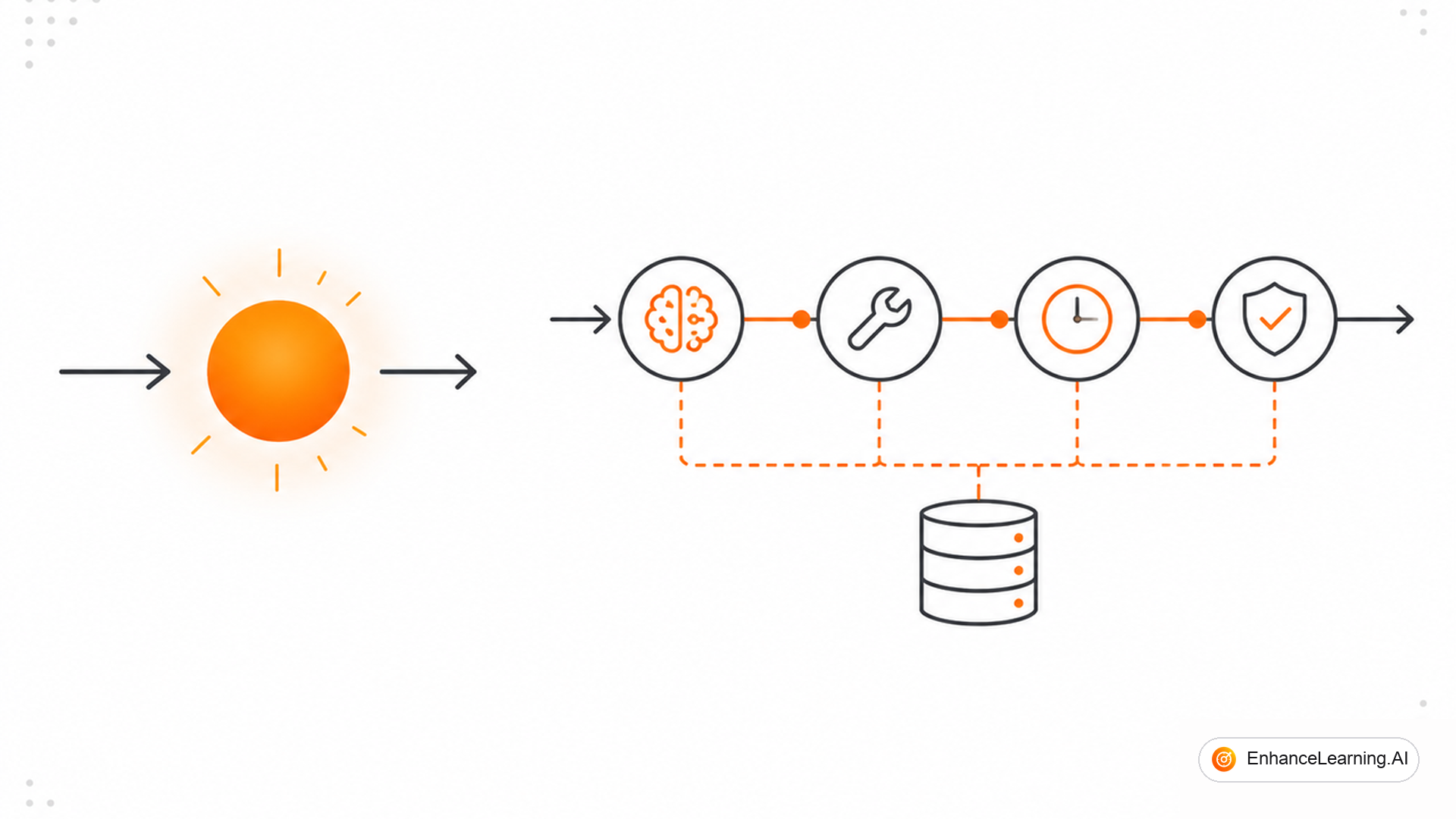
Every architecture review starts the same way: someone draws a box labeled "LLM" and asks whether that is the whole system. Sometimes it is. A well-crafted single call can rewrite an email, classify a support ticket, or extract fields from a short form — fast, cheap, operable. Other times that box is a placeholder for six steps, three APIs, a human approval, and a week-long wait that no HTTP request should survive. Confusing the two shapes every downstream decision: staffing, eval, infra budget, and incident response.
What a single LLM call actually is#
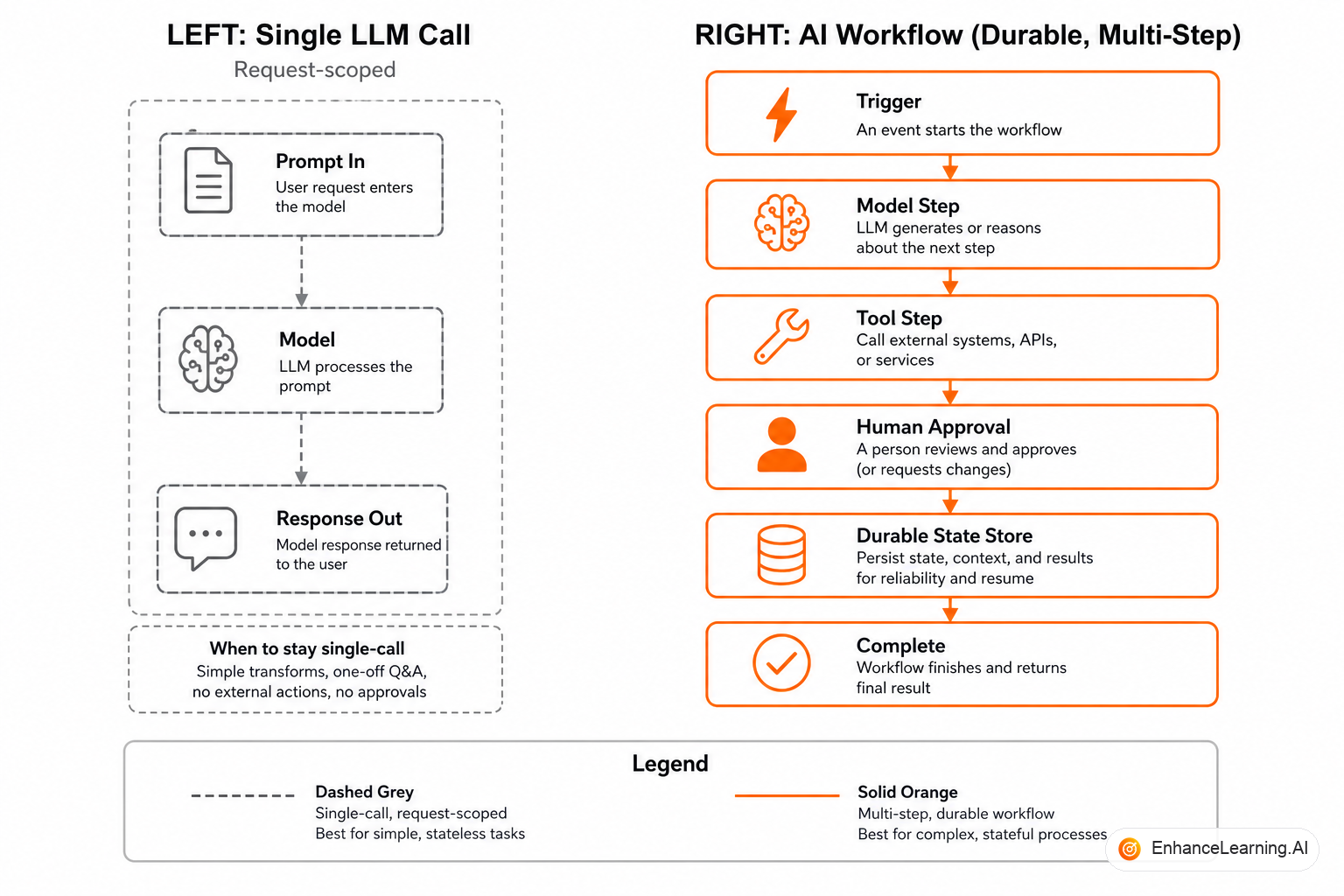
A single LLM call is one inference request with bounded input and output, completing in seconds to low minutes. The caller owns orchestration outside the model: fetch context, assemble the prompt, invoke the API, parse the response, return or store the result. There is no durable process id, no checkpoint between substeps, no workflow engine remembering where you paused.
That is a feature when the task is self-contained. Summarize this document. Draft a reply given this thread. Extract structured fields from this invoice image. The failure modes are local: bad output, timeout, rate limit. Recovery is "call again" or "show the user an error."
What an AI workflow adds#
An AI workflow is a durable, multi-step process where at least one step involves model inference, and the process — not the caller's memory — owns state across steps, time, and failures. Steps may include non-model work: database lookups, webhooks, human tasks, timers, compensating actions.
The boundary is not "one model call vs many model calls." You can have a workflow with one model step and five deterministic steps. You can have five model steps in a single synchronous request (prompt chaining) that is still not a workflow because nothing persists if the process crashes.
| Dimension | Single LLM call | AI workflow |
|---|---|---|
| Lifetime | Request-scoped | Process-scoped (minutes to weeks) |
| State | Ephemeral in caller | Persisted with workflow id |
| Failure recovery | Retry whole call | Resume from checkpoint |
| Human involvement | User in UI | Async approval nodes |
| Side effects | Usually none or immediate | Gated across steps |
| Operability | Log the request | Track instance trajectory |
If you need a row in that table from the workflow column, a single call is not enough — regardless of how many times you invoke the model inside one handler.
The decision framework#
Ask four questions before choosing single-call vs workflow architecture.
1. Does the process survive the caller dying? If the user's browser closes or the API pod restarts, must work continue? Contract review that waits three days for legal is a workflow. Inline autocomplete is a single call.
2. Are side effects irreversible or high blast radius? Draft generation can be a single call. Issuing a refund based on model interpretation needs checkpoints — which implies workflow machinery even if some checkpoints are synchronous.
3. Does quality require multi-stage validation? One call can embed chain-of-thought internally, but you cannot inspect intermediate artifacts, retry one stage with different context, or route borderline cases to humans without decomposing into steps.
4. Does operational accountability require audit trails per step? Regulated industries often need "who approved what, when, on which model version" — not just "here is the final JSON."
type ArchitectureChoice = "single_call" | "workflow";

interface TaskProfile {
  maxDurationMinutes: number;
  irreversibleSideEffects: boolean;
  needsHumanAsync: boolean;
  needsPerStepAudit: boolean;
}

function recommend(profile: TaskProfile): ArchitectureChoice {
  if (
    profile.maxDurationMinutes > 15 ||
    profile.needsHumanAsync ||
    profile.needsPerStepAudit ||
    (profile.irreversibleSideEffects && profile.maxDurationMinutes > 2)
  ) {
    return "workflow";
  }
  return "single_call";
}
That heuristic is blunt on purpose. It forces the conversation before you bind a week-long business process to a Lambda timeout.
Production scenarios on each side#
Single call wins: support ticket tagging. Input: ticket subject and body. Output: category label and priority. Wrong label? Agent fixes it in the UI. No external writes. Latency under two seconds matters. One call, structured output, done.
Single call wins: meeting notes cleanup. Input: raw transcript chunk. Output: polished summary for the same user session. No downstream automation depends on it. Failure is "try again."
Workflow wins: vendor security review. Steps: ingest questionnaire, extract answers with model, cross-reference against policy corpus, flag gaps, route to analyst, wait for response, re-evaluate, publish decision to procurement system. Spans days. Multiple model steps. Human in the loop. Writes to systems of record.
Workflow wins: claims adjudication assist. Model proposes payout; rules engine validates; fraud model scores; high amounts route to adjuster; approved claims post to payment API. You cannot responsibly collapse that into one prompt and pray.
Five sequential model calls in one Python function are still a single request from the infrastructure's point of view. If the function dies on call four, you start over. That is prompt chaining — useful, but not durable orchestration.
The grey zone: fat single calls#
Teams stretch single calls with long context windows, tool use in one session, and "agent" loops inside one process. That works until duration, cost, or reliability breaks it.
Signals you have outgrown the fat call:
- Timeouts become your primary failure mode
- You manually persist partial results to Redis "temporarily"
- Operators ask "where is ticket 8842 in the pipeline?" and you grep logs
- Retries duplicate side effects because there is no idempotency layer
- Different steps need different models or temperature settings hidden in one mega-prompt
Each signal is a workflow requirement wearing a script costume.
Cost and latency trade-offs#
Single calls optimize for simplicity: one billable inference (maybe one tool round-trip), predictable latency, easy A/B on prompt versions. Workflows add orchestration overhead — database writes, queue messages, worker CPU — but allow cheaper models on easy steps and expensive models only where needed.
A document processing pipeline might use a small model for layout detection and a large model only for ambiguous clauses. In a single call, you pay the large model for everything or accept quality loss. Workflows let you allocate compute surgically.
Eval implications#
Single LLM calls eval at the input-output pair level: given this prompt, is the output acceptable? Workflows eval at trajectory level: given this case file, did the right sequence of steps occur, were gates respected, was the final outcome correct?
Using workflow eval on a single-call feature wastes effort. Using single-call eval on a workflow hides step-level regressions — the classic "final answer looks fine but we started approving fraud."
Migrating from single call to multi-step#
Teams often start with a single call because it ships in a sprint. Six months later the feature owns a business process. Migration signs:
- Extract the implicit steps already in your prompt ("first do X, then Y") into named nodes.
- Persist inputs and outputs per step before optimizing.
- Introduce a workflow engine or durable job pattern — do not invent your own state machine in Postgres over a weekend unless you enjoy on-call.
- Move side effects to the end of the graph behind explicit gates.
- Add instance-level tracing before you tune models further.
Platform team implications#
Single-call features belong on the inference path your team already operates: rate limits, prompt versioning, output parsing, shadow traffic for eval. Workflow features belong on a process platform: instance store, worker pools, human task UI, SLA monitors. Mixing both into one "AI service" without boundary creates teams that own everything and operate nothing well.
Staff accordingly. A platform engineer who excels at low-latency inference is not automatically the right owner for week-long approval flows — and vice versa.
Contract with product and legal#
Product often asks for "the AI to handle the whole thing." Legal asks what the system can do autonomously. Your architecture answer should map cleanly: single call = draft or classify within session; workflow = process with persisted obligations and gated writes. That vocabulary prevents shipping autonomous side effects behind a chat UI because nobody wrote down which shape you built.
Summary#
A single LLM call solves localized language tasks with bounded blast radius and request-scoped lifetime. An AI workflow coordinates durable processes where model steps interleave with systems, humans, time, and side effects — and where crash recovery and audit matter. The difference is not how many times you invoke the model; it is whether the process has an identity that outlives any single request. Draw that boundary before you pick tools, write evals, or promise SLAs.
Want premium architecture blueprints?
Be among the first to explore interactive reference architectures, implementation playbooks, and premium engineering resources at launch.
Related Articles
Recommended reading based on this topic.
Designing Reliable AI Workflows
How to design AI workflows that survive retries, long-running steps, and human approval — with explicit state, idempotency, and failure paths you can operate.
Read ArticleThe Difference Between Orchestrated AI Workflows and Ad Hoc Scripts
Formal workflow engines versus informal scripted automation — and how to recognize when orchestration infrastructure becomes necessary.
Read ArticleFrom Stateless API Calls to Stateful AI Workflows
Ephemeral API calls versus processes that accumulate context, decisions, and partial results — the baseline vocabulary for workflow design.
Read Article