
Horizontal vs Vertical Scaling for GPU-Backed AI Workloads
When to add GPU nodes versus upgrade existing ones for LLM inference — tradeoffs across model size, traffic patterns, latency targets, and budget.
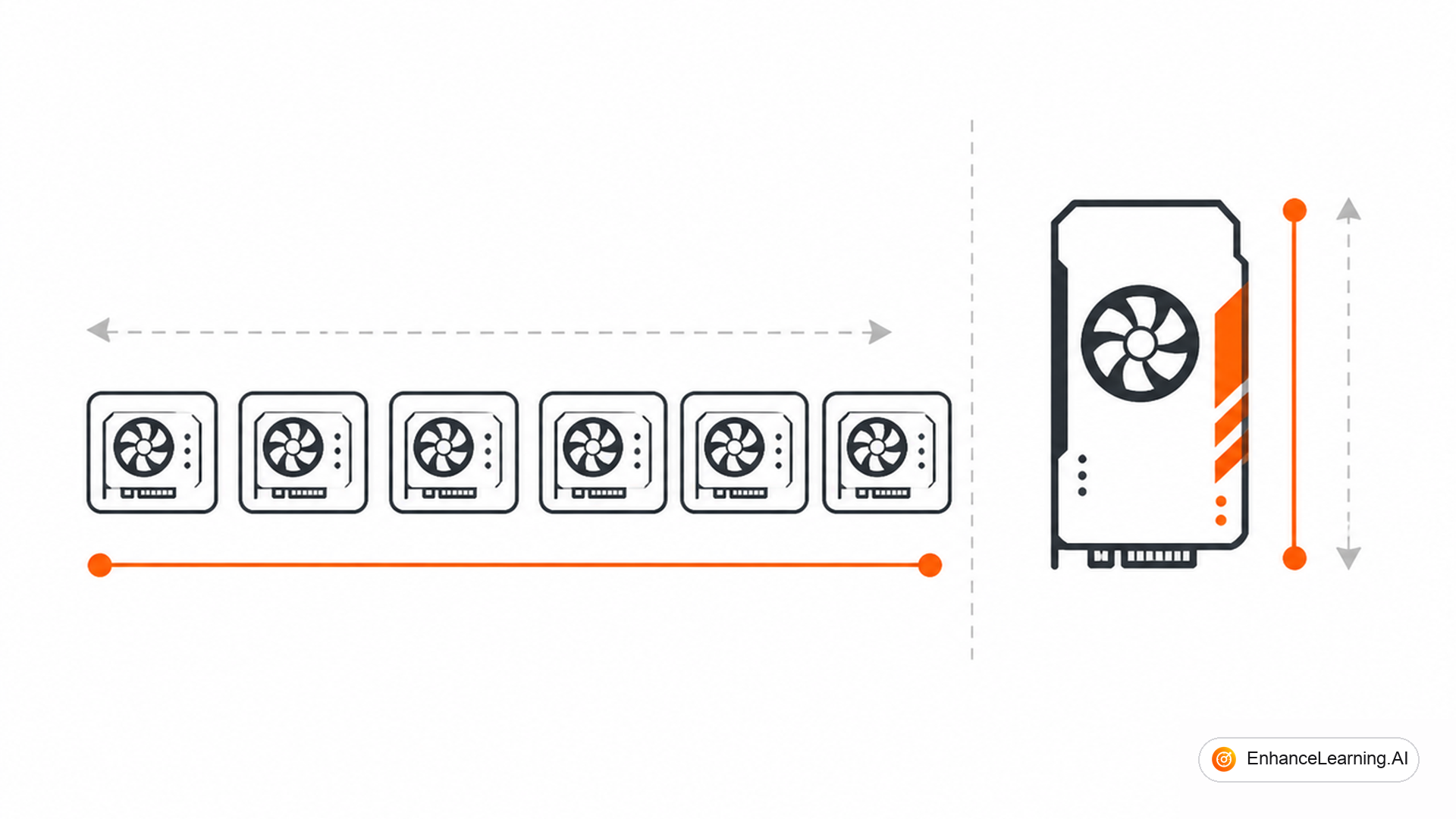
Your inference cluster is saturated. p95 queue wait time crossed 400ms. Finance approved more GPU spend. Now you face the decision that looks simple but rarely is: add more nodes with the same GPU spec, or upgrade existing nodes to larger GPUs? Horizontal and vertical scaling solve different bottlenecks. Picking wrong wastes money for quarters.
What each strategy actually changes#
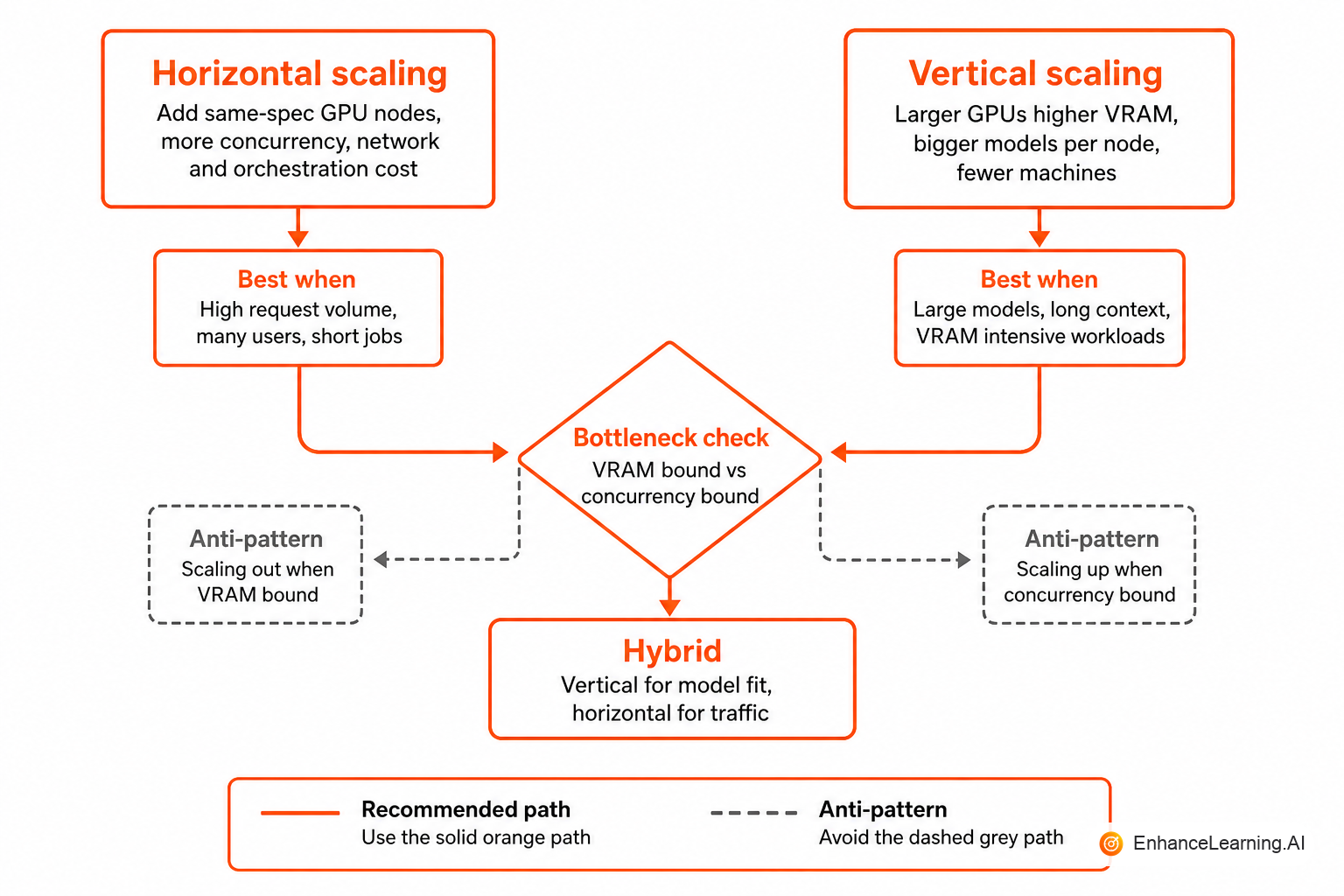
Vertical scaling — increase capacity per node. Swap A100 40GB for A100 80GB, or H100 for H200. Same node count, more memory, more compute per machine. Often requires downtime or pool drain to resize.
Horizontal scaling — increase node count. Add identical GPU workers to the pool. Same per-node capacity, more aggregate throughput. Requires load balancing, scheduling, and network that scales with node count.
Neither is universally correct. The right choice depends on which resource is the bottleneck: memory, compute, or request concurrency.
Model size drives the vertical default#
If your model does not fit in GPU memory — or fits with no room for batching — vertical scaling is often the only option short of model quantisation or tensor parallelism across nodes.
| Model profile | Typical VRAM need | Scaling bias |
|---|---|---|
| 7B FP16, batch 32 | ~24–32 GB | Horizontal once it fits |
| 70B FP16 | ~140 GB | Vertical or multi-GPU node |
| 70B INT4 quantised | ~40–48 GB | Horizontal after single-node fit |
| Embedding model (small) | <8 GB | Strong horizontal bias |
A 70B model on four A100 40GB via tensor parallelism is a vertical-plus-topology decision, not pure horizontal. You are scaling up a single logical instance before you scale out copies of it.
Quantisation changes the math. A team running 70B FP16 on two 80GB nodes switched to INT4 and ran three replicas on six identical nodes — horizontal scaling became viable only after vertical memory pressure dropped.
Traffic shape drives the horizontal default#
Once the model fits comfortably on one node with batching headroom, horizontal scaling usually wins for throughput:
- More nodes absorb concurrent requests without lengthening queue wait
- Rolling deploys and canary pools are easier with multiple replicas
- Failure isolation improves — one bad node does not take the entire pool offline
Vertical scaling helps when individual requests are large (long context, big batches) and you need more memory or FLOPs per request, not more parallel requests.
Interactive traffic with high concurrency and moderate context lengths: horizontal. Batch jobs with very long contexts on few concurrent streams: vertical first, then horizontal copies of the upgraded node profile.
Profile whether you are memory-bound, compute-bound, or queue-bound before approving hardware. nvidia-smi utilisation at 30% with saturated queue depth means you need more replicas, not bigger GPUs. Utilisation at 98% with OOM errors means vertical or quantisation.
How to compare cost#
Compare cost per token at target utilisation, not sticker price per GPU.
Horizontal example: six L4 nodes at $0.80/hr each, 70% utilisation, 120 tokens/sec aggregate throughput. Vertical example: two A100 80GB at $2.40/hr each, 75% utilisation, similar aggregate throughput.
The cheaper option depends on your cloud discount structure, reserved instance terms, and whether vertical nodes sit idle during low traffic while horizontal nodes scale to zero (if your orchestrator supports it).
| Factor | Horizontal | Vertical |
|---|---|---|
| Idle cost during low traffic | Scale in replicas (if supported) | Fixed large node cost |
| Ops complexity | Scheduling, load balancing | Simpler pool, harder resize |
| Blast radius | Single node failure | Larger per-node failure |
| Deployment speed | Add node in minutes | May require migration |
| Max model size | Limited per node | Higher ceiling |
Self-hosted teams often over-verticalise because "one big machine is simpler." That simplicity erodes when the big machine is 40% utilised at 3 a.m. and still costs full price.
When horizontal scaling fits#
Choose horizontal when:
- Model fits on your current GPU profile with batching room
- Queue depth — not per-request memory — is the bottleneck
- You need canary deployments and blue-green pool rollouts
- Traffic is spiky and your orchestrator supports autoscaling replicas
- You want AZ or region redundancy across nodes
Kubernetes with GPU-aware scheduling, or dedicated inference schedulers (SageMaker endpoints, Modal, Baseten-style platforms), make horizontal scaling operable. Without orchestration, adding nodes manually does not scale operationally — it scales chaos.
from kubernetes import client, config

config.load_incluster_config()
apps_v1 = client.AppsV1Api()

def scale_inference_pool(deployment_name: str, namespace: str, replicas: int) -> None:
    body = {"spec": {"replicas": replicas}}
    apps_v1.patch_namespaced_deployment_scale(
        name=deployment_name,
        namespace=namespace,
        body=body,
    )

def autoscale_signal(queue_depth: int, current_replicas: int,
                     target_depth_per_replica: int = 10,
                     max_replicas: int = 20) -> int:
    desired = max(1, (queue_depth + target_depth_per_replica - 1) // target_depth_per_replica)
    return min(desired, max_replicas)
Scale on queue depth per replica, not CPU percentage. GPUs report low CPU while inference queues grow.
When vertical scaling fits#
Choose vertical when:
- Model weights plus KV cache exceed current VRAM at acceptable batch size
- Long-context requests dominate and memory grows linearly with sequence length
- Network overhead between nodes hurts tensor-parallel performance
- You run one or two large models, not dozens of small ones
- Horizontal replicas would each sit underutilised because traffic is too low
Vertical scaling is also the right first move when migrating to a larger model family — moving from 7B to 70B often requires bigger GPUs before any horizontal discussion makes sense.
Hybrid patterns that work in production#
Most mature deployments combine both:
- Vertical to fit the model and target batch size on one node
- Horizontal to replicate that node profile for throughput and availability
- Separate pools — interactive replicas on horizontal pool; batch jobs on vertically sized long-context nodes
A third pattern — disaggregated prefill/decode — scales prefill and decode stages independently. Prefill is compute-heavy; decode is memory-bandwidth-heavy. Splitting them is advanced but increasingly common at high scale.
Autoscaling traps specific to GPU workloads#
- Cold start latency — new replicas need model load time (minutes for large models). Scale-out triggers must fire before queue depth becomes user-visible pain.
- Scale-in too aggressive — removing a replica mid-batch disrupts in-flight requests. Use drain periods.
- GPU fragmentation — horizontal adds nodes but scheduler packs poorly; effective capacity is lower than expected.
- Licence and quota limits — cloud GPU quotas cap horizontal scaling until finance opens a ticket.
Set minimum replicas > 0 for interactive pools. Scaling from zero saves money and destroys latency SLOs.
Decision framework#
Answer these in order:
- Does the model fit in VRAM with production batch size? No → vertical or quantise first.
- Is queue depth the primary bottleneck at acceptable utilisation? Yes → horizontal.
- Is traffic spiky with predictable peaks? Yes → horizontal with autoscaling and min replicas.
- Are requests long-context and few concurrent? Yes → vertical memory first.
- Do you need zero-downtime deploys? Yes → horizontal with at least two replicas.
If you answer horizontal but lack orchestration to manage replicas, invest in orchestration before buying hardware. The GPUs will not help if one engineer SSHs into nodes to balance load.
Migration and resize without user-visible outage#
Vertical changes often require draining a pool — finish in-flight requests, stop new dispatch, swap hardware or resize VM, reload weights, warm up, rejoin the pool. Plan for 15–45 minutes per node depending on model size. Horizontal adds capacity without draining existing nodes if load balancing distributes new traffic correctly.
Use blue-green pool patterns: stand up a new pool at the target size, shift alias traffic gradually, decommission the old pool. This works for both scaling directions and is the safest path when product SLOs forbid hard downtime.
Document rollback: if the upgraded vertical profile does not improve tokens/sec per dollar, revert alias routing before finance closes the quarterly review.
Summary#
Horizontal scaling adds GPU nodes to increase aggregate throughput and availability when the model already fits with batching headroom. Vertical scaling upgrades per-node memory and compute when the model, context length, or batch size exceeds current hardware. Profile the actual bottleneck — memory, compute, or queue — before approving spend. Most production pools end up hybrid: vertically sized nodes, horizontally replicated, with separate profiles for interactive and batch traffic. The wrong scaling choice does not fail immediately; it fails expensively, every month, on the cloud bill.
Want premium architecture blueprints?
Be among the first to explore interactive reference architectures, implementation playbooks, and premium engineering resources at launch.
Related Articles
Recommended reading based on this topic.
The Architecture of a Production LLM Inference Platform
Production LLM inference as control and data planes: intake, routing, compute scheduling, response delivery, and observability — a platform mental model.
Read ArticleInference Infrastructure is Where AI Features Survive Production
Reliability, latency, and cost are decided at the inference layer — not by prompts or model choice alone. Why the operational foundation matters most.
Read ArticleThe AI Inference Stack Explained
A clear map of the AI inference stack: gateways, model serving, caching, embeddings, queues, and observability — and what to own versus buy at each layer.
Read Article