
MCP as the Tool Interface for AI Systems
How Model Context Protocol standardizes AI tool and context access — one server model, many hosts, with policy still enforced at the edge.
Every AI app reinvents tool wiring: ad-hoc JSON schemas, one-off auth, and prompt text that describes APIs the model might call. Model Context Protocol (MCP) is an attempt to make that wiring a standard interface — so hosts (IDEs, agents, desktop apps) can discover and use external tools and context sources without a custom integration per vendor. You do not need MCP to build agents. You need a strategy for tool sprawl; MCP is one serious answer.
The problem MCP targets#
Without a shared protocol, each model host speaks a different dialect of "tools." A filesystem connector written for one chat app does not work in another. Enterprises end up maintaining N adapters for N clients. MCP pushes toward: one server implementation, many hosts.
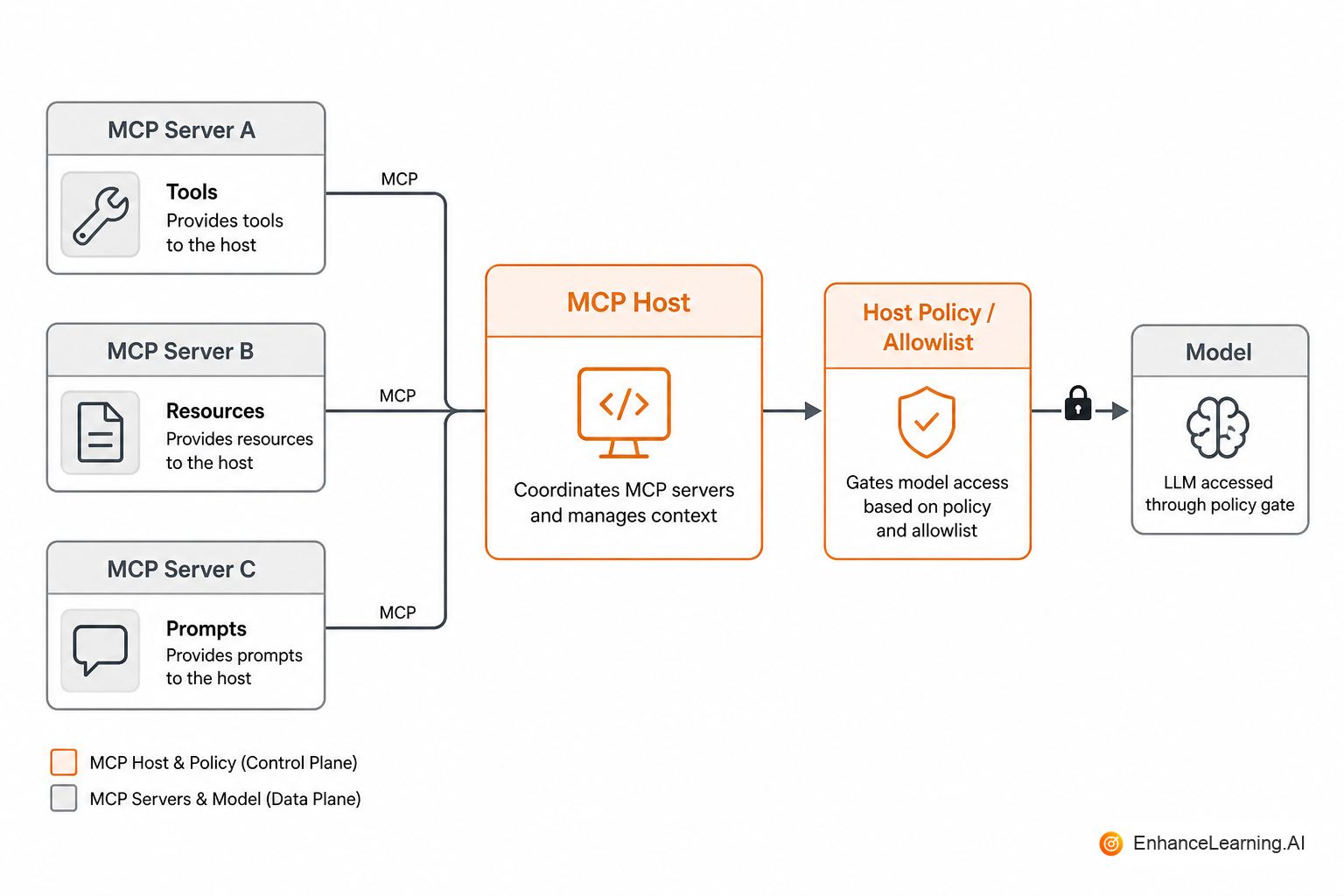
Think of MCP servers as capability providers — browsers, issue trackers, internal APIs — and MCP hosts as the applications that attach those capabilities to a model session.
Core ideas (without the hype)#
At a practical level, MCP conversations center on:
- Tools — actions the model may invoke (with schemas)
- Resources — readable context (files, tickets, docs) the host can fetch
- Prompts — reusable prompt templates a server may expose
- Transport / session — how host and server connect (local or remote)
Exact message shapes evolve; the architectural point does not: capability discovery over a protocol, instead of pasting OpenAPI fragments into a system prompt and hoping.
Why teams care#
| Pain today | What a protocol helps |
|---|---|
| Rewrite connectors per chat product | Implement once as an MCP server |
| Opaque tool lists in prompts | Machine-readable discovery |
| Inconsistent auth stories | Centralize auth in the server/host boundary |
| Shadow IT model apps | Inventory servers; apply shared policy |
MCP does not magically make tools safe. A standardized dangerous tool is still dangerous. It does make inventory, allowlisting, and review more tractable.
Host vs server: a code sketch#
Hosts still own policy. Servers expose capabilities:
// Host-side: only expose allowlisted MCP tools to the model
async function toolsForModel(session: McpSession, allow: Set<string>) {
  const discovered = await session.listTools();
  return discovered.filter((t) => allow.has(t.name));
}

async function callTool(session: McpSession, name: string, args: unknown) {
  if (!allow.has(name)) throw new Error("blocked by host policy");
  return session.callTool(name, args);
}
Whether you use an official SDK or wrap HTTP, keep that split: discovery ≠ permission.
List every tool your agents can call today — internal APIs, SaaS, scripts. Mark which ones deserve a shared server vs staying private to one app. Adopt MCP first where two or more hosts need the same capability.
Adoption pitfalls#
- Exposing raw production admin APIs as MCP tools without scopes
- Trusting server-provided prompts as if they were your system policy
- Skipping human review when a new server joins a host used by many engineers
- Assuming local equals safe, a local server can still exfiltrate via network tools
Remote MCP adds ordinary service concerns: authn/z, rate limits, audit logs, versioning. Treat servers like any other dependency with a blast radius.
When not to bother yet#
If you have one internal agent and five stable tools behind your own API gateway, a clean internal tool registry may be enough. Revisit MCP when a second host (IDE assistant, desktop agent, vendor app) needs the same enterprise connectors — or when vendors you buy from expose MCP and you would rather consume than re-wrap.
Security review for each server#
Add an MCP server the way you add a dependency with network and data access:
- What resources can it read?
- What tools can it execute?
- Where do credentials live, and can the model see them? (They should not.)
- What is logged, and for how long?
- Who is allowed to enable it for a host used by many people?
Relationship to OpenAPI and existing gateways#
MCP does not replace your API gateway. Many teams will wrap existing HTTP APIs as MCP tools with tighter, model-facing schemas — fewer fields, clearer enums, friendlier errors. Keep the stable enterprise API for software clients; expose a curated MCP surface for assistants. Duplicating every CRUD endpoint into tools is how agents become confused and dangerous.
Versioning and lifecycle for MCP servers#
Treat each server as a versioned service contract:
- Semantic versioning on tool schemas — adding optional fields is minor; renaming or widening required args is major
- Deprecation window — hosts should warn when a server version is past support before it breaks silently
- Changelog visible to consumers — "tickets v2 adds assignee filter" beats discovery through failed tool calls
- Pinning in production hosts —
@1.4.xfor stable workflows;@latestonly in sandboxes
When a server exposes both tools and resources, version them together or document independent lifecycles. Nothing frustrates platform teams like a resource URI that moved while tool names stayed stable.
Ownership matters: every catalog entry needs a team, on-call rotation, and an SLA for security patches. Orphan MCP servers with OAuth to production SaaS are shadow IT with a standards badge.
Local vs remote deployment tradeoffs#
| Deployment | Fits when | Watch out for |
|---|---|---|
| Local (stdio / local process) | Dev machines, single-user hosts, air-gapped demos | User laptop becomes credential store; hard to audit centrally |
| Remote (HTTP/SSE, org-hosted) | Shared hosts, enterprise catalog, centralized policy | Latency, auth complexity, rate limits |
| Vendor-hosted MCP | You trust vendor scope and logging | Data residency, blast radius if vendor compromised |
Local is not automatically safer. A local server that reads ~/.aws/credentials and exposes run_shell is worse than a remote read-only tickets server behind your SSO. Decide based on where secrets live and who can enable the server, not on whether the process runs on localhost.
For enterprise rollout, prefer remote servers in your VPC with the same ingress and logging standards as internal APIs. Developers connect hosts to the catalog; they do not each install unaudited binaries from a README.
Start with two or three high-reuse servers — tickets read-only, docs search, internal HR policy — before you MCP-wrap every internal API. Breadth without review creates a catalog nobody trusts. Depth on shared capabilities builds the habit of host-side allowlisting and server-side scoping.
Summary#
MCP matters because tool and context integration was fragmenting faster than teams could maintain adapters. It standardizes how hosts discover and call capabilities; it does not replace allowlists, auth, or evals. Use it to reduce connector sprawl, keep permission at the host, and treat every new server as code that can act with your users' authority.
Want premium architecture blueprints?
Be among the first to explore interactive reference architectures, implementation playbooks, and premium engineering resources at launch.
Related Articles
Recommended reading based on this topic.
Why Agent Interoperability Depends on MCP Protocol Maturity
Interoperability follows adoption breadth, consistent implementations, and ecosystem health — not spec compliance alone.
Read ArticleMCP and Agent Portability Across Model Providers
A standard tool protocol decouples agent hosts from model vendors — how MCP reduces rewrite cost when you swap or multi-home models.
Read ArticleThe Difference Between MCP and Agent-to-Agent (A2A) Protocols
MCP standardizes tool and context access for model hosts; A2A protocols coordinate agents — conflating them leads to wrong architecture choices.
Read Article